
When you have no signal
Your family page is designed to keep working even when your phone has no signal — useful at the bottom of a slope or in a parking garage.
What still works
Once you’ve opened the page at least once on this device, the following work offline:
-
Reading today’s events, RSVP statuses, athlete pills.
-
Tapping Yes or No — your tap is remembered locally and uploads when you’re back online.
If the app can’t send it later because the coach has closed RSVPs for that event, your tap won’t quietly disappear: the button goes back to what it was and you’re told why. Anything that fails because you’re offline or the server is busy keeps retrying.
-
Tapping quick messages (“Out sick”, “Running late”) — same thing: queued locally, sent when you reconnect.
-
The change-log banner with what’s recently changed.
-
The chat panel showing the last 48h of channel posts (the copy from when you were last online).
What doesn’t work offline
- The first visit to your family page on a new device — you need a network connection to load the data the first time.
- Sending a quick message that goes through Telegram — falls back to queue mode.
- The Telegram-channel “open” button — opens Telegram app, which itself needs signal.
The offline banner
When your phone goes offline, a yellow bar appears at the top of the page:
● Offline — your changes will sync when you're back online.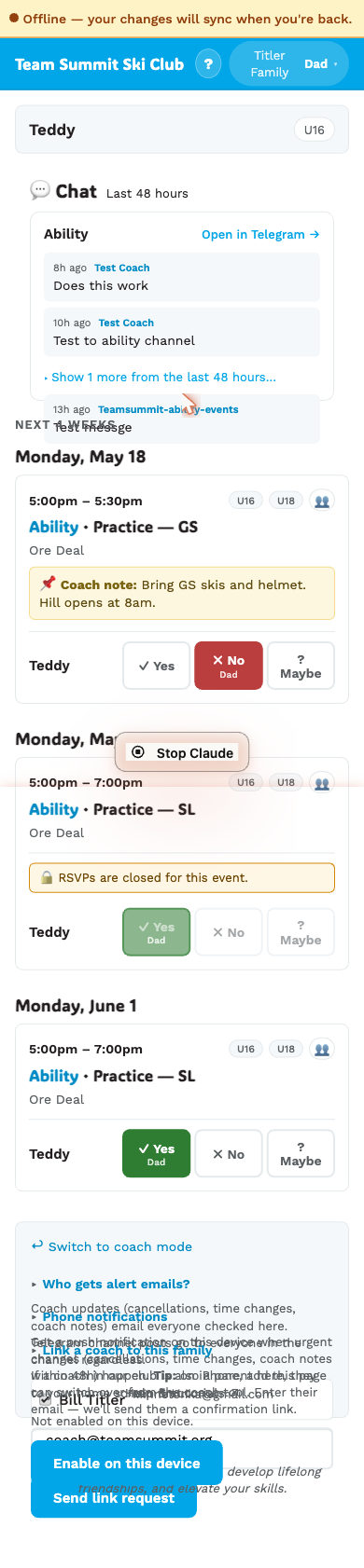
A small “N pending” chip on the right shows how many of your taps are queued up.
When you’re back online, the bar flips blue and reads “Syncing…” while it flushes. Once everything has uploaded, the banner disappears and the page refreshes.
Behavior across browsers
This works in any modern browser. On iOS, you’ll see slightly more aggressive tab unloading (Apple memory-pressure stuff) — if you return to the home-screen icon and see a click-to-reload placeholder, that’s iOS’s behavior, not ours. Tap it and the cached page reloads.
Will I lose my RSVPs if my phone dies before syncing?
The queue is in your browser’s local storage. As long as you don’t “clear site data” or factory-reset the device, the queue survives a phone restart. Next time you open the page online, it flushes.
If you switch to a different device to RSVP while offline (e.g. phone runs out, switch to iPad), your offline taps on the phone won’t sync until that phone comes back online — your iPad RSVPs are independent.