
Finding your family page
Every family has its own page at ts.onsnowlive.com/<your-family-slug>
(for example, ts.onsnowlive.com/smiths). The slug is just a short
nickname — it’s the only thing you need.
The first time
You’ll get an invite email from the club. The email has a one-tap link that takes you straight to your family page.
Screenshot: invite emailTap the link. You’ll land on your family page with your athletes listed at the top and upcoming events below.
The invite is good for 7 days and can only be used once.
If you don’t claim right away — reminders are automatic
If a few days go by without you clicking, the system sends two friendly reminders so the invite doesn’t quietly expire on you:
- Day 3: a short “still time to claim” email.
- Day 6: a final “expires tomorrow” email.
Once you tap the link and your family is claimed, no more reminders fire. If the 7-day window passes and you still haven’t claimed, just ask your coach to re-send the invite — they can do it from the admin panel.
After that — bookmark it
Once you’ve been to your page, the easiest way back is:
- Add the page to your phone’s home screen (see Add to home screen). Recommended.
- Or bookmark the URL in your browser.
- Or go to
ts.onsnowlive.com/me— we remember your slug in a cookie, so this redirects you straight to your page on the same device.
I forgot my slug
Two options:
- Check the original invite email — the link contains the slug.
- Go to
ts.onsnowlive.com/me. If your device has a cookie, it bounces you to your page. If not, it shows a small form to type your slug.
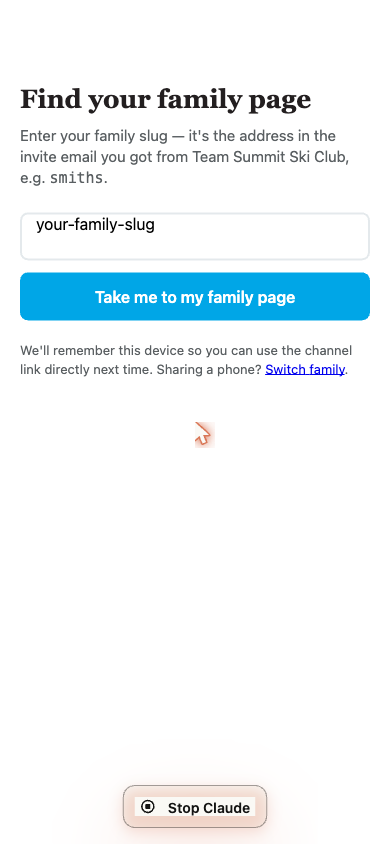
If you don’t remember and you’re on a new device with no cookie, ask your coach — they can look it up.
What’s a “slug”?
A short, lowercase, one-word nickname for your family. Examples:
smiths, johnsons, patel-family. It’s the part of the URL after the
slash. Slugs are stable — once set, they don’t change.